For a lot of marketers, automation seems like the final frontier. A distant plane that they aspire to, but are unsure of how to get there, or if they ever will.
One of the ways we see automation popping up all over the internet today, is through the use of automated chat bots.
What are chat bots?
You’ve probably seen chat bots on some of your favorite web sites. You’re scrolling along a page, and little dialogue box pops up in the corner asking if you have any questions or something along those lines. Sometimes there’s actually a real person on the other end of the chat box, but often, there’s a bot.
A bot, simply put, is a series of automated responses, that are sent based on your (the customer’s) behavior. If you say or do a certain thing, a certain response is ‘triggered.’
A quick run-down of bot-talk
- Trigger: action that causes the bot to do something
- Logic: the set of rules that determines the bot’s responses
- Actions or Operations: the different things that your bot is capable of—a set of related actions creates your bot’s logic
How do you make a chat bot?
Not too long ago, in order to make a chat bot you would have needed pretty extensive coding knowledge. That is no longer the case. Making chat bots is now easy, and free to do.
Before you jump into choosing a chatbot plugin, or coming up with a kitschy name for your brobot, figure out what you want the bot to do. For your purposes, you should have a specific goal in mind for your bot. Think about where in your funnel, or where in the buyer’s journey someone would be if they are interacting with your bot. Consider the context of the conversation, and turn it into a conversion by delivering exactly what they want, immediately, via chatbot.
Start simple
If this is your first time programming a bot, you’ll want to keep it simple.
One of the easiest and most effective bots I’ve come up with, is the “schedule-a-call” bot. This is a bot that appears when someone is deeper into your funnel and may be ready to schedule a meeting. This bot can be tweaked for nearly any industry, but the point is to direct a contact to schedule some sort of meeting with you.
The logic of this bot is simple. The bot appears and is very transparent with the 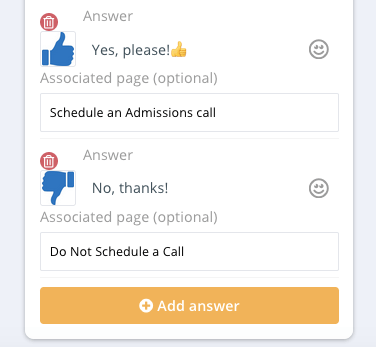 customer.
“Hello, I’m a bot who’s here to help you find the information you need. Are you interested in scheduling a meeting with a rep?
Yes… No…”
The yes and no links are the triggers that will determine which actions fire next. In the case of the contact clicking yes, they will be redirected to an online calendar to schedule their call, and fill in their contact information.
In the case of the contact clicking no, our bot directs the customer to commonly needed information.
“That’s ok! In case you needed more information, our customer’s usually find these pages helpful: x,y,z
…
If you need to get in touch, you can reach out to support@chatbotexample.cb”
The logic of this bot is pretty simple, and the execution is not very difficult.
Can I actually set something like that up?
Yes. Totally. For free. In about 10 minutes. I’m not kidding.
Free chat bot building software
The two tools that I utilize most often, are Hubspot Bots, and MobileMonkey for Facebook chat bots.
Both of these tools offer free chatbot creation and management software. They allow you essentially drag and drop the actions you need, adding in your own personalized text and links.
Give it a shot!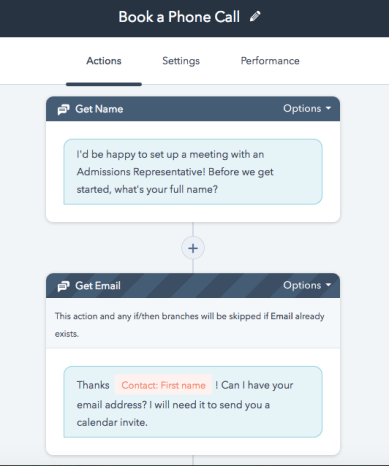
Jump into one of the softwares and see for yourself. You really don’t have anything to lose.
Try setting up a “Schedule-a-call” bot, or something similarly simple. Make sure you add a prompt for the customer to click a simple (yes-or-no) option. Lead them where they want to go, in the simplest way you can think of.
Experiment with dropping in the simple “Yes and No” option from the Schedule-a-Call bot. You can even drop them in as cool looking links or icons. Create a ‘logic tree’ that follows what your customer would want to know. Be sure you’ve optimized the chat to grab the contact info you need, too!
Pro-tip:
Don’t let your bot logic, or your customer, hit a dead end. Always have an option to go back, change your mind, or move onto something new. For instance, in my 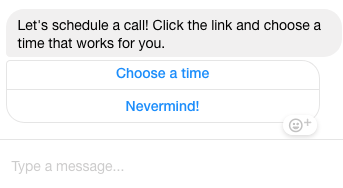 Schedule-a-Call bot, I also give the option to say “Nevermind, I’m not read to schedule a call” after they click yes. That way, they can loop back to the information they need, rather than staring at the scheduling calendar and not converting.
Be sure to run a test on your bot, and note any points that seem awkward or illogical. If you don’t find any of those… you’re ready to unleash this conversion machine on the web! Choose a page to connect to on your website, or your facebook page, and the next thing you know, you’ve got a live bot!
Need help setting up your chatbot? Drop me a line. I’m happy to help!

 DeMaio Digital Marketing
2 thoughts on “Getting Started with Chat Bots”