Independent schools, from early childhood institutions through high schools, are increasingly active on social media—connecting with parents, students, alumni, and prospects in a slew of different ways. From simple twitter updates, to viral lip synch videos, schools are trying it all to connect, engage, and stay relevant on the web.
Private Schools on LinkedIn
What we’ve noticed, though, is that LinkedIn tends to be the forgotten channel for most schools. They post semi-regular updates, and have some engagement (a few “celebrations” and the occasional encouraging comment) but that’s it…
No intentional network-building; no strategic amplification of messages; no active brand-building of the school or the employees; no next-generation recruitment strategies.
These are all things that LinkedIn is literally built for! The independent school scene need only borrow and tweak from some of the best LinkedIn business brands to adapt the platform to their needs.
Check out the full eBook here!
Why Schools Should be Using LinkedIn
LinkedIn can be used for a number of basic purposes. A solid strategy incorporates all of the purposes that will help to grow your business, and ignores those that will not help. Traditionally, independent schools have only been hitting on maybe two of these purposes—and not particularly well.
That is… if they are present on LinkedIn at all. We’ve uncovered a number of well-known schools with no branded LinkedIn page to speak of.
Schools that work on all of these facets intentionally, positively impact admissions, development, retention, and recruitment. LinkedIn has enormous potential for schools. As a platform, it is underutilized, with less than 30% of brands and individuals actively creating content. There is a void to be filled, and a relevant audience to be engaged with.
A Perfect Opportunity
For schools specifically, this window of opportunity is even wider. The folks dominating the conversation on LinkedIn are rarely educators and schools. Information about education, and the education of your audience’s children will be a complete pattern interrupt for most regular LinkedIn users.
This is a good thing! You can actually break through the noise on LinkedIn—which is much more difficult on the oversaturated social media platforms like Facebook and Instagram.
Moreover, most LinkedIn users are professionals with disposable income (worldwide, the average income of a LinkedIn user is over $48k)—and the population of regular LinkedIn users skews towards younger professionals. Many of these folks are having kids (or considering it) and looking at education options for the first time.
Check out the demographic info below. 65% of LinkedIn’s active users are between 18 and 49, with 37% of total active users falling between 30 and 49 years old. The most well-represented age segment on LinkedIn is the exact segment most independent schools are interested in targeting.
| Ages | Percentage of Active Users |
| 18 – 29 | 28% |
| 30 – 49 | 37% |
| 50 – 64 | 24% |
| 65+ | 11% |
With a winning strategy, you can grow your brand’s influence to become the most trusted educational institution in the eyes of this highly-valuable LinkedIn user base.
Let’s start by defining the traditional purposes for which schools and other businesses use LinkedIn.
Purpose 1: Building your network
While this seems like a vague “vanity metric,” it has to be stated that any time you’re engaging with a social networking site, you are trying to grow your network. On LinkedIn this means creating more “connections” or having more “followers.”
Ideally, your network will be composed at least partially of your ideal prospects. More on that later.
Building a network of engaged followers is a great first step towards success on LinkedIn. But that’s really all it is; a first step.
Purpose 2: Keeping your Audience Informed
One of the most basic uses of any social networking site is to keep your audience informed. For an independent school, that often means keeping students and parents abreast of new events and initiatives.
Some schools do this well, but most are inconsistent, at best. There is also opportunity for diversifying the types of messages being sent, and the audiences they are intended for. We’ll explore more of the different types of posts you can make, later on.
Purpose 3: Building and displaying a brand
For businesses and individuals, LinkedIn is used for creating and maintaining a brand image. You can leverage any number of assets to define and solidify your brand—videos, blog posts, podcasts, short form posts, photos and captions—but LinkedIn is where those assets can be aggregated succinctly, and displayed to your prospects and followers.
Independent schools often struggle with differentiating themselves, with regards to their branding. There may be attempts at authentic branding, but they often come across as generic and/or flat. We’ll check out some examples and how they could be improved, below.
Purpose 4: Generating leads
Generating leads is the ultimate purpose of LinkedIn, in the business world. You want to draw people to your content, to your brand, and eventually to your business. For an independent school, this could mean prospective students/families—but it could also refer to donors, job recruits, or partner institutions.
Generating leads doesn’t exist in a vacuum, though; your brand, updates, and audience all contribute to your ability to generate leads. This is where it all starts coming together.
Bonus Purpose: Supporting your staff
This is one that should be on everyone’s list, but is not. Your brand’s LinkedIn presence can really help support the personal brands of your staff—which will serve your business in return.
Engaged, evangelist employees make for tremendous “salespeople” when it comes to showing off your school; they help to boost the reach of your brand’s (and other employee’s) posts; and they help to attract top talent to open positions at your school.
Building up the personal brands of your employees also displays your school as one that is staffed only with experts and influential thinkers. Supporting the brands of your staff, and encouraging them to build their own brands and networks, consistently works to support your school’s image and reach.
A Cohesive Approach to LinkedIn
LinkedIn is a multifaceted beast. Clearly, there are a number of purposes that it can be used for, and there are countless strategies that can be used to assist those purposes. The best strategy for any organization is one that accounts for your goals, eschews the unnecessary, fits your mission, and supports your staff.
Outlined below is a step-by-step plan to create an active, engaged, lead-generating LinkedIn machine—from an independent school’s branded LinkedIn account, and the personal accounts of those who care about the school.
Accountability and Buy-In
There are two main facets to this approach. One is the work of the social media manager/digital marketer in charge of managing the LinkedIn page—which includes the ongoing work of coaching, prompting, and encouraging employees and community members to build their own personal brands. (This guide makes the assumption that the social media manager in charge of this effort is also the reader.)
The other facet, of course, is the work that your employees and volunteers put in. Sure, you’ll be helping and coaching, but this strategy depends on a network of employees actively growing their brands and networks along with the school’s. It’s going to take some active effort on their part—but not without reward.
Much of this outline is dependent on the buy-in of your organization. But—it’s a reciprocal relationship. Your school’s brand can do just as much to support the members of your organization, as they can to support your brand—if done correctly. Once begun, it’s easy to show and tell your community members how we all benefit from working together on LinkedIn.
To get started, we’ll look at what needs to be done from the standpoint of a the marketing team, to make sure this effort is successful in the long term.
Optimizing Brand LinkedIn Page
For starters, you’ll want to make sure that your LinkedIn brand page is optimized and up to date. Check the simple things like your logo and your website link. Are they current? Is the image blurry? Does the link actually work?
Now let’s get into the fun stuff. Here are the most important aspects of your LinkedIn profile to focus on.
Tagline
Your tagline is the first thing that most people are going to read about your school when they find you on LinkedIn. For many (possibly most) schools, the tagline seems to be a variation of their mission or vision statement.
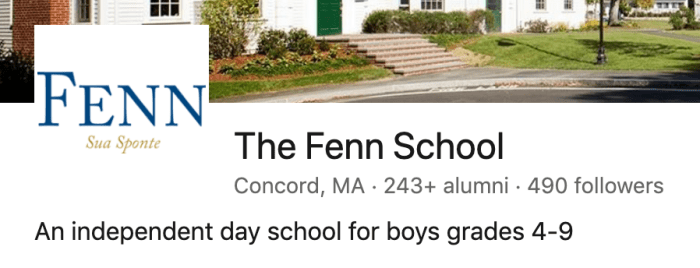
I think this is a good start—but it’s important to remember just how small of a space your tagline can occupy before it gets cut off. If your mission starts with something generic, that’s all anyone will see.
It’s important to be concise, but original. Leverage something that your school does differently.
“An independent day school for students aged 2-12” is not original. It doesn’t convey any value or personality. And it won’t get someone to click on your page.
Think: what do we do differently?
“Education embedded in the outdoors.”
“Where students control the classroom.”
“Boarding but not bored.”
“Uniforms: Yes. Uniformity: No.”
It doesn’t have to be all-encompassing. It doesn’t have to speak to your entire mission.
It’s a jumping off point. A conversation-starter. An ice-breaker. And a signal to your prospective followers, of what they can expect from the page. Give them a hint of your brand’s personality in your tagline.
Remember—this is cyberspace. It doesn’t have to be permanent. If your tagline isn’t connecting with the audience, document that; ask yourself and your audience “why;” and try something else.
This isn’t about striving for perfection, it’s about striving for connection.
PAGE Banner Image
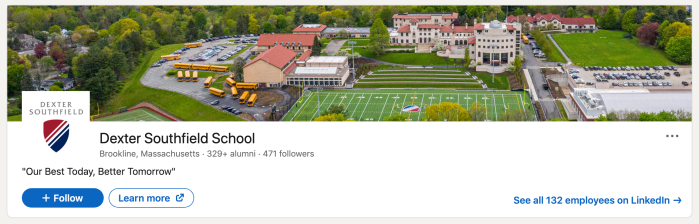
The next thing that jumps out at a viewer on LinkedIn is the banner image atop the page.
There are a lot of ways to utilize the real estate that your banner occupies. This is a great opportunity to keep your connections up-to-date on your latest campaigns—whether that’s fundraising; admissions; or retention/event-based.
I suggest finding a positive picture of your students and cropping it to banner size (I prefer doubling up the suggested size, to assure good resolution: 2,256 x 382). Most schools have a decent banner image, either of the campus or of students at work—but that’s where they stop.
I also suggest adding a short snippet of relevant text (in your brand’s header font), to draw viewers into your profile. That could be an invite to your next event… or a call-to-action asking viewers to engage with a certain piece of content, contact your school, or take some other desired action.
If your page immediately conveys the value of your school, you can convert leads right from your banner image.
Tip: Remember that in some views, including mobile browsing, your logo image will occupy the bottom left corner of your banner image. Keep your text and the focal elements of the image out of the bottom left area.
About Section
The about section will be the first thing to greet a prospect who has clicked onto your brand page, once they scroll past your header image. Here’s where you’ll include the pertinent information about your school.
Most school pages use this area to go into a multi-sentence paragraph, or multi-paragraph letter, describing what it means to attend their school. I think this approach is funnel-blind.
Folks on your LinkedIn page want to learn more about you, sure—but when they first click into your page, they are more interested in the basics. Give them the information that they need to know first, and follow it up with the information that you want them to know after.
If you’re searching for a school for your child, you likely need to know the following things:
Location;
Ages served;
Contact information;
Boarding vs. traditional;
Co-ed vs. gendered;
Tuition/Tuition Assistance options.
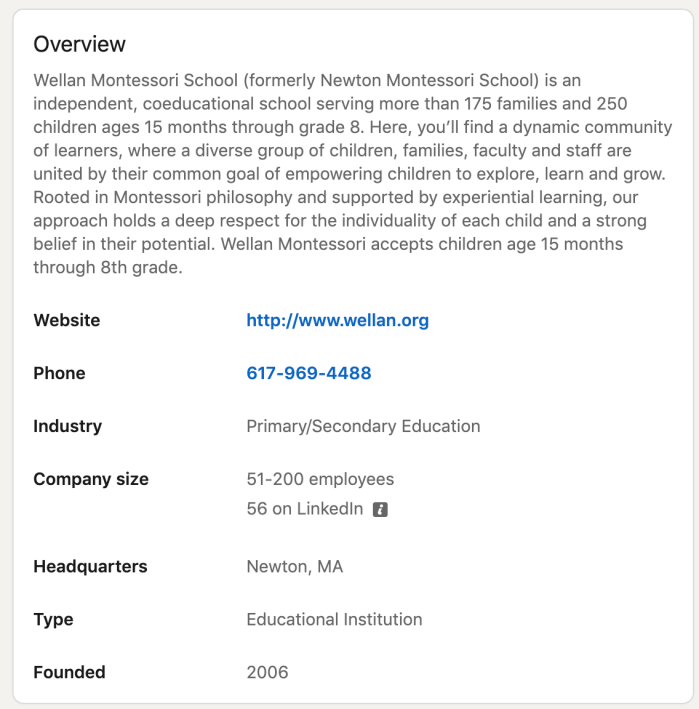
This is top of funnel information that someone needs when they first enter your page. Make sure that these pieces of information stand out and are easy to read.
This is not an exhaustive list, of course, and knowing exactly what to include will take some customer research.
In this same window, when a viewer clicks to “see more” they will also see your information listed under each category, specifically. You can set this up by filling out your “About” section, and subsections, accordingly.
Featured Posts and Recent Videos
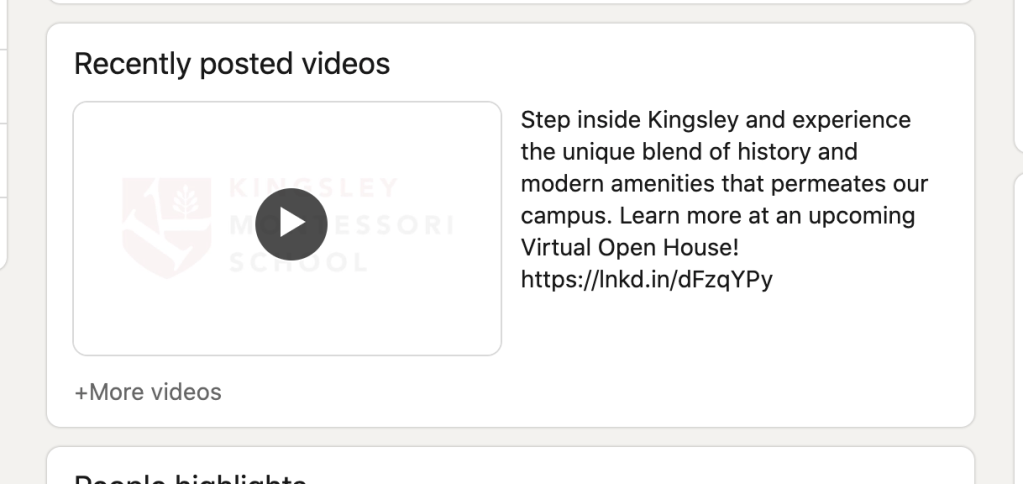
The next thing a prospect will find on your page is your featured post(s). LinkedIn prioritizes certain types of posts and activity to highlight on your page. The best and easiest way to leverage this algorithm, is to hack the “Recently Posted Videos” section.
LinkedIn will highlight the most recent video that you uploaded and posted, with the option to view all of your videos. This is specifically for videos that you uploaded to the LinkedIn platform—as opposed to videos you shared as links within a post.
This is an important distinction. You want to make sure that only your most powerful videos are being uploaded as LinkedIn videos. Think of it as a gallery of your best, branded videos. Any other videos should be shared as links.
Keep it Current
It’s always best to use timely focus pieces. (Don’t be that school with a “Welcome Back to School” video that stays up until December…) Knowing that LinkedIn is going to highlight the most recently uploaded video on your page can be used to your advantage.
Subscribe to get access
Read more of this content when you subscribe today.
As the social media manager, you should always have a plan for the next video you are going to upload to LinkedIn—knowing that it will be prominently featured until your next video.
Each time you kick off a campaign, there should be a video uploaded to LinkedIn to explain that campaign. When that campaign ends, there should be a wrap-up video uploaded, letting everyone know that the campaign has ended. Preferably, this will be a piece of video content with a text transcription—so that it can be watched, listened to, or read.
Part of your content strategy, generally, should be describing and promoting your campaigns and events in all the places where your prospects are gathering.
You can also have a “back-up” post that you can highlight for those times when you just can’t create anything fresh. (Virtual tours, parent testimonials, or video interviews with staff and students work great for this purpose.) Just don’t leave it up long… Replace it as soon as you start your next campaign.
LinkedIn video content should be a main part of your content distribution plan.
Connecting Employees
Here’s where it starts to get really fun. Connecting with your coworkers, and connecting them with the brand. Having your employees listed on LinkedIn has a number of benefits, and plays into another hack we use to grow our audience and influence.
Employees are more likely to see and interact with your posts in their feed—as opposed to when those same people aren’t listed as employees. Moreover, you can choose to notify employees of certain posts, so that LinkedIn will send them a push notification. This is one great way to get eyes on a new post that you want to be seen by a wider audience. Engagement breeds engagement—so having a built-in audience of interested, active users is a great first step.
For this reason, we encourage everyone who works with us, whether full-time, part-time, or on a volunteer basis, to have a LinkedIn account, and to associate themselves as employees—as part of the on-boarding process.
How to List Yourself as an Employee on LinkedIn
When LinkedIn users add or edit a position on their profile, they can specify the organization to which they are connected. If they select a company, university, or high school from the list generated by LinkedIn, they automatically show up on that organization’s page as an employee.
There is currently no way for a LinkedIn admin to add employees to their page. Employees must fill the information out on their own profile.
I suggest sending a friendly email to your staff, including these exact instructions.
Use these steps to double-check that you are connected to your brand’s LinkedIn page:
- Click the Me icon at the top of your LinkedIn homepage.
- Click View profile.
- Scroll down to the Experience section and click the Edit icon next to the position you want to update the company for.
- Click into the Company text box and type in the name of the correct company, university, or high school.
- Select the company, university, or high school from the dropdown menu that appears.
- Click Save in the bottom right corner of the page.
We encourage our community members to create employee roles as Committee Chairs, Committee Members, Board Chairs, Board Members, Parent Association Leaders, and more. Anyone who has a formal title with us, whether it’s a volunteer position or otherwise, gets an employee role in our LinkedIn universe.
Which brings me to my next point—interconnecting coworkers to further boost influence.
Once everyone in your organization is listed as an employee, and is following your brand page, the next step is for your employees to grow their networks by connecting with each other. This is an easy way for each employee to boost their personal brand, and create a web of support for our branded content.
Connections
This is where the employee work on LinkedIn really comes into play; but there are ways that you, as a brand manager, can assist with this.

First, encourage coworkers to go to your page, look at the “employees” link, and start connecting with everyone you have listed there.
This is very easy way to grow each staff member’s professional network. It also acts as another way to connect new staff members to the community, so they can start learning names, faces, and titles.
Second, tag employees in LinkedIn posts and encourage them to engage, and connect with other people who are tagged, or who engage with the post. This is a great way to use your knowledge to connect likeminded people, and help grow the knowledge base of your staff.
You can do this systematically when you hire a new employee, or when someone takes on a new role or title. You can also call out individuals or groups to congratulate them on specific successes. We’ll get into more specific types of posts you can make below, and the different outcomes this can lead to.
Create More Admin Roles to Grow Your Page
Beyond growing the number of employees connected to your page, you also want to grow the number of followers. Of course, your employees and board members are a great place to start, but we enjoy using a little hack to keep the page growing.
As an admin of a LinkedIn brand page, you can invite your connections (up to 100 at a time) to follow your brand page. You probably see where I’m going with this one.
Most schools depend on only a handful of folks to serve at their page admins. I would argue that expanding those roles to more staff members and volunteers is beneficial for a number of reasons. First, it gives your staff more buy-in and a greater sense of ownership over the page. Second, it allows more individuals to invite their favorite LinkedIn connections to follow your page.
Once you’ve identified your brand evangelists, reward them by giving them guest access to the LinkedIn page as a guest admin! Encourage each of these employees or board members to make a post from the brand page. This is their chance to leverage your hard work of brand-building, to boost their own brand.
Once they’ve introduced (and tagged) themselves in a branded post, encourage them to invite their most engaged connections to follow your page as well.
Inviting Connections to Follow your Page
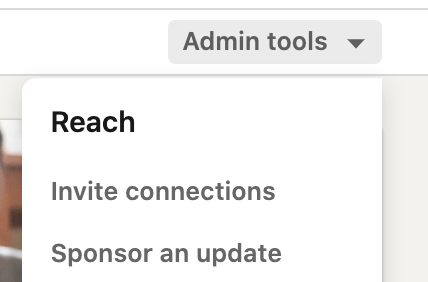
To invite connections to follow the page, simply navigate to the page and click the “admin tools” dropdown. Inviting connections is the first option. Click that link and you’ll see a pop-up window in which you can choose a number of connections to invite.
You can only invite 100 connections at any given time, so be selective!
How to Add an Admin to Your Page
Note: If you are not currently an admin of the LinkedIn page, you can request access through your brand’s page. The current Admins (and Super Admin) will be able to approve your request.
Use these instructions to add yourself as an admin, if needed:
- List your current position with the organization on your profile. This step is required.
- Go to the brand page.
- Click the three horizontal dots indicating the More icon and select Request Admin access from the dropdown.
- Click the checkbox to verify that you’re authorized to become an Admin of the Page.
- Click the Request access button. You’ll see a notification indicating that your request was successfully sent.
- You’ll receive confirmation in your Notification tab once you’ve been assigned Page Admin access.
If you already have admin access on your LinkedIn page, you can begin adding other Admins to help you out with your duties. Note: the creator of the LinkedIn page is automatically granted “Super Admin” access.
To add someone else as an Admin to your Page:
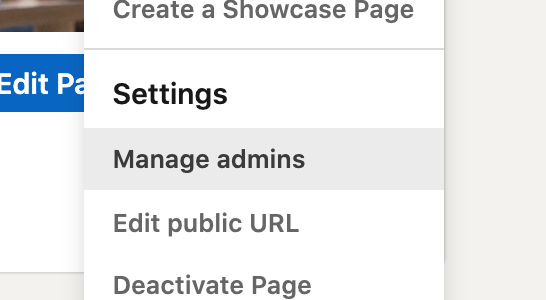
- Access your Page Super Admin View.
- Click the Admin tools dropdown at the top of the page and select Manage Admins.
- Click the Page Admins or Paid Media Admins tab.
- Click the Add Admin button.
- Type the name of the member, associated employee, or advertiser you’d like to add in the Search for a member… text field.
- Click the member’s name from the menu that appears.
- Select the Page Admin role.
- Click the Save button.
A branded LinkedIn page can generally have up to 50 admins at any given time. So that shouldn’t be an issue when getting started. Now that your support system is in place, it’s time to get moving on creating content!
Sharing and Tagging the Brand Page
Once your coworkers begin creating a network among themselves, and your page starts gaining traction internally, it’s time for the staff to share their own expertise. This will build their own brands, in tandem with the school’s. This involves sharing content from the school page, but also creating original content and harnessing the power of their individual networks.
As the brand steward, you should lead this effort by example, both on your personal page and the brand’s page. Focus on creating valuable, interesting content that your staff will want to share. Write about what you see happening in the school, in a way that could help other educators, parents, or school administrators.
Your staff seeing someone that they know personally being authentic and confident on LinkedIn can have a powerful effect.
One of the most powerful things that a staff member could do on LinkedIn, is to write a post, tag a coworker, tag someone outside of the organization, and tag the brand page. This opens the post up so that it can be seen by multiple networks of people, and passes some of that engagement onto the brand page.
This is a lot to ask in a single post—but it’s easier if you work up to it, and demonstrate the effectiveness in your own examples. Use every opportunity you can find to bring more people into the conversation by tagging them in your posts and/or comments.
Types of Posts You Can Make
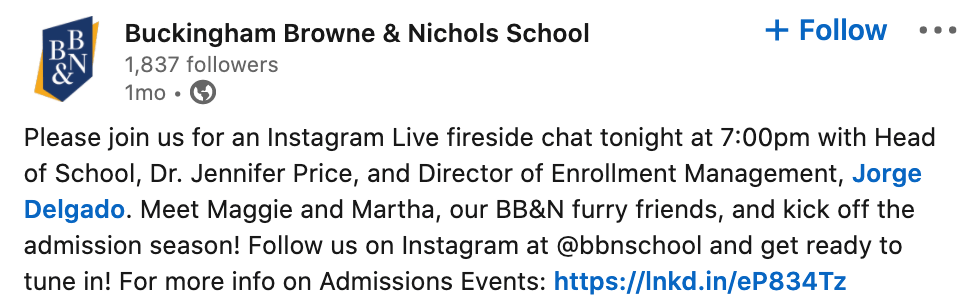
Try to set a goal for your staff, and lead by example. Your marketing team and leadership team should be setting the example by posting positive updates about school, and tagging relevant staff members.
Both the brand page and the personal pages of your higher-ups and marketing team can start with simple posts that outline successes, lessons learned, and valuable strategies, discovered with other staff members. Here are some specific types of posts that should be easy to start with:
Take note of a new technique you observed, that could be applied in other classrooms. Share with the other educators you are now connected with. Thank the person who showed you the new technique.
Share a resource that one of your staff members shared with you. Tag the organization responsible for the resource and the staff member who brought it your attention. Show gratitude to both, and outline the value of the resource for others.
Thank your coworker for teaching you something. Be specific about what you learned, and the value it conveyed to you and your organization.
Congratulate someone on finishing a tough day, or completing a long-term goal. Be authentic. Everyone has difficult days and everyone has great days—acknowledging that, celebrating that, and normalizing that will boost morale, and show the human side of your school.
Consider creating a “content waterfall” that will help keep fresh content flowing. Start by creating a long form piece—a blog post, a video, a podcast, etc.—and segment out smaller bits from it that can be repurposed in a variety of ways.
Celebrating your staff for specific wins, especially in a public setting, is always good practice. Utilizing that praise to effectively grow your own brand is a win-win!
Bonus tip: For extra engagement, add a related link in the comments of your own posts, and include note of that in the post. Something like “Check out the full blog/video/interview etc., linked in the comments.” This tactic can drive increased engagement on your post, and bring extra traffic to your website. Win-win.
Striving for Consistency
Keeping a consistent presence on LinkedIn yields dividends over time. As I’ve said before, engagement breeds engagement. This applies to a single post, continuously popping back up as more folks engage with it, but it also applies to your page as a whole.
If you can have multiple posts creating engagement at once, the effect compounds. LinkedIn is more likely to show your new posts to people who have engaged with you in the recent past. If you let your momentum cool off, you have to start from a more difficult position again. In short, consistency is key on LinkedIn.
Sharing the Workload
Say you have a staff of 80 employees. It would only take each employee tagging the school 4 times per year, for your brand to be consistently tagged every weekday all year long (and then some). With school leadership and your brand management team leading the charge by example, it shouldn’t take much effort on any one person’s part.
If you can incorporate a few more brand ambassadors into that mix you can easily have a consistent environment of tagging and network expansion. Consider having each board member agree to tag the school a certain number of times, or have each volunteer leader tag the school for every time they run an event or gathering, for instance.
Brining in more people gives you the benefit of sharing the workload, but even more importantly, your brand will be on display to a much wider audience of LinkedIn users.
Benefits of Consistent Content Creation
When someone tags your school or your employee, that post is boosted onto the timelines of each of the people tagged. Beyond that, the post is also more likely to be seen by the people who have recently interacted with the people (or pages) who have been tagged.
This has an exponential, snowball effect—especially when the posts are of good enough value to have others interact with them. When you tag more people, more often, your group of active, engaged followers will grow.
As that list grows, more people interact with the content, and it perpetuates. LinkedIn is one of the only platforms where you can actually come across posts from weeks, even months ago, if they are still being engaged with. (Huge bang for your buck, compared to the fleeting nature of some other social media sites.)
In other words, if you tag a coworker and your brand in a post, that coworker is likely to interact with the post, boosting your post even further, and putting your brand in front of more people. As more people interact with that post (especially by tagging others in the comments), it proliferates across more people’s feeds. The trick is consistency—to keep the algorithmic momentum rolling.
Network Building
Consistent posting; hashtagging; tagging people; engaging with valuable content; and actively connecting with new, relevant professionals should be ongoing goals for everyone on your staff. Each staff member should be setting aside about 20 minutes per week—that’s all it will take—to connect with a new peer, leave a couple of valuable comments, celebrate a few updates from others, and create at least one solid post.
For those who want to lead the charge, the magic number seems to be 10-3-1. Reach out to ten new connections you’d like to know; leave three helpful, substantive comments; and make one useful, valuable post. Per DAY.
If ten connections, three comments, and one post per day seems like a bridge too far, start by aiming for 10-3-1 per week. Then see if you can step it up to twice a week. Once you get into the groove, it becomes a lot easier to find things to say.
It should also be a goal for each staff member to reach out to professionals they admire, and connect with them. For every time we connect with a professional in person, over zoom, at a conference, via email, etc. we should each be seeking that person out on LinkedIn, dropping them a kind note, and connecting with them there.
Authentic and Professional
Starting from the Head of School, down to your newest interns, everyone should be sharing their experience and insight on LinkedIn. Nearly everyone overthinks LinkedIn content. For that reason, people will push back when you suggest this. Your Head of School will likely push back. Other staff members will likely push back. They either “don’t have the time,” or don’t want to “look unprofessional.”
The issue at play here, is that most people think that in order to look “professional” they’ll need to dedicate huge amounts of time to crafting beautiful pieces of content—masterpieces fit for an educational review journal! It will be your job to break through that misconception. The biggest issue will be breaking the idea that to be “professional” you can’t be “authentic.” (Quite the opposite, in fact.)
LinkedIn is a professional platform, but we are all humans. We all need help, we all need to ask questions, we all need to vent, brag, celebrate, and pontificate. It’s imperative that your senior staff lead this by example. A school’s brand is nothing without the people who create it.
Chances are, they are already creating this content. Snippets can be repurposed from community emails, social media videos, or presentations to staff. A large percentage of the things worth sharing with your staff or parent community, are worth repurposing for your LinkedIn audience as well.
Types of Posts Your Staff Can Make
Your coworkers should already by seeing the example set by your team, and your early adopters. They can utilize similar types of posts to start getting their feet wet on LinkedIn.
Shout out a coworker who helped you through a tough moment. Explain how they helped, so that others can gain value from the post.
Thank a colleague for teaching you a new resource, skill, or method. Once again, outlined what you learned, and who you learned it from, so that you are adding value to your followers’ feeds.
Tag an educator or author you admire, and thank them for teaching you something specific from their books or courses. This is a great way to build your network and authority as a thought leader.
The ultimate goal of this ongoing network building, posting, and tagging, is that your brand will start appearing in front of exponentially more eyes, without paying a dime in ad spend. As the network of each of your employees grows, and the network of the brand page grows, each interaction that your posts garner will be more impactful. A wider ring of people will notice that post when one of your staff members is tagged or interacts.
And… each post that your brand page makes, will be in front of a much wider audience—composed of people who have engaged with the posts you made, were tagged in the posts you made, were tagged along with you in a post, or interacted with the posts you were tagged in. People like potential donors, prospective parents, or new world-class recruits…
Wrapping it Up
That’s a lot of information. I hope you can see the way these tactics fit together, and the potential for their impact.
I want to emphasize that this is not a project that one person, or even one small team, can implement alone. It will take someone to spearhead the plan, and guide the organization, but without the buy-in and ultimately the action of the school staff, this plan will not be as effective.
It may seem like there are an overwhelming number of “moving parts” to this plan. But when you break it down into action steps, it isn’t so bad. Start with the things you can do “behind the scenes” to get your page ready to go. Start building organizational momentum around the idea and the potential. Make a habit of doing your part to connect, post, and engage on a regular basis. Lead by example.
And then… nudge, nudge, nudge, nudge your staff to follow suit. Show them the positive results of your work. Show them how their coworkers are building brands and helping the school. Demonstrate the value. (You know, be a marketer.)
Let’s break it down.
Action Steps for Social Media Managers
Let’s break this down into a set of next steps for the each of the main stakeholders here. The first steps will be taken by the social media manager/brand steward/LinkedIn champion. (You. The one reading this.)
- Analyze your school’s LinkedIn page
- Does it exist?
- Is it devoid of content? Logos? Images?
- What’s the status?
- Optimize your page
- Tagline
- Banner Image
- About Section
- Invite staff and volunteers to list their positions as “employees”
- Send instructions for how to list their positions on their own pages (template included)
- Encourage coworkers to connect with each other to build their networks
- You can view other employees of the school right from the branded page
- Add your “in-the-know” coworkers as admins
- Encourage new admins to invite their connections to follow the page
- Start getting buy-in from “stakeholder” staff
- Start with School Leadership, Admissions, Development, Communications and work outwards from there
- Show them this playbook
- Give small goals to interested folks (think 10-3-1, per week)
- Start creating content
- Post valuable content on your personal LinkedIn and the brand page
- Use a “content waterfall” strategy to keep shorter form pieces flowing
- Encourage staff to create their own content
- Encourage in person
- Use statistics
- Engage with their content
- Continually engage with relevant content
Action Steps for Staff
The action steps for your staff to take are going to be largely guided by… you! So, be aware of what you’re asking. Here are the next steps your coworkers should be taking, starting with your team and school leadership:
- List their positions with the school
- Connect with coworkers
- Follow the school’s page
- Engage with/share page posts
- Connect with relevant professionals
- Create their own content!
Action Steps for School Community
The last group of people you’re going to have to convince to get on board is the wider school community. Start with your board members and most engaged volunteers.
Start small and encourage these folks to do the following:
- List their positions with the school
- Connect with staff members
- Follow the school’s page
- Engage with your posts
- Share relevant posts
- Tag the school for specific events and initiatives
- School to provide content and timing support
Moving Forward
These action steps represent a comprehensive “first round” of LinkedIn brand building. As with any successful marketing initiative, it will take ongoing support, research, and continued improvements.
Once you connect with the most engaged folks in your community, and they begin to follow the plan, it will be more easy to show the impact of this work to a wider swath of your community. As this community builds, you can start implementing the hallmarks of successful content marketing strategy, by engaging different buyer personas with with your LinkedIn content, and walking prospects down a more specialized funnel.
To start, your focus is on growing brand influence, network, and awareness. Later on, you can focus on specializing your content to specific facets of your audience, as you would on your school’s website. You can build out content to support admissions, retention, and staff recruitment, specifically—in addition to the content you are already creating to support your brand and staff.
If leveraged correctly, your staff, and prospective staff will see the benefit of this plan every time they log on to LinkedIn. They’ll be even more excited to be a part of it, as they see their personal brand grow in tandem with the school’s.

 DeMaio Digital Marketing